
Behind the build
Escaping Blue Light: Making a Better Screen Dimmer
A developer's quest to create a screen dimmer that actually feels natural and respects your eyes.

One late night ago, I was coding up a storm. I had my Mac's Night Shift enabled, but my eyes felt little consolation even on the warmest setting. Unphased by the mediocrity of Night Shift's barebones implementation and limited configurability, I did what any self-respecting software engineer would do: I built my own.
The result is Screen Mercy, a screen dimmer that follows the real sun and fades your screen like a natural sunset.
Existing Solutions
f.lux is the only serious contender for this kind of niche, but it has always disappointed me back when I was a windows user. Looking at the screenshot for Mac, the UI is no different. Please observe:
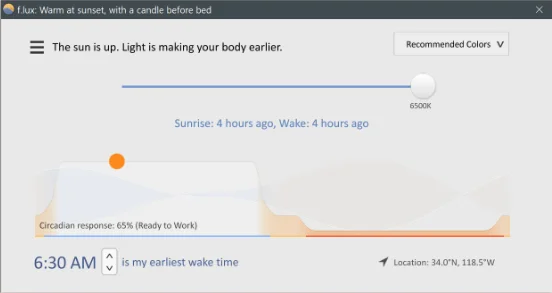
This UI has more arbitrary phrases than a bucket of Panda Express fortune cookies: "The sun is up. Light is making your body earlier.", "Circadian response: 65% (Ready to Work)" (???), "Warm at sunset, with a candle before bed." I appreciate the emotional support, but I would rather have information that isn't here. First: what exactly is being adjusted? Second: might I have a bit more control over what is being adjusted?
Side Note: I very much appreciate the makers of flux. They made a great free product, helping millions of people, turning down lucrative offers to bundle spyware and advertising in their software. The world needs more engineers with a moral compass like these guys.
Apparently not. And the limited functionality is indeed a problem. Every day, my sister, who has used f.lux for nearly ten years, adjusts the "time of day" multiple times throughout the day.
"What are you doing?" I asked her. She didn't understand the question.
There has to be a better way.
The thought of my sister toggling f.lux to pretend it is 9 p.m. or 5 a.m. when it is noon, depending on the cadence of her migraines and the cloud cast over Vancouver, torments me.
Equally distressing is the fact that after she dutifully adjusts f.lux before every work session, she then presses the physical buttons on her external monitor to finesse the temperature of the light a little more.
We are all familiar with the notion that when you switch contexts, you lose 22 minutes to the fruitless work of recontextualization, yes? In that case, if my sister is any indication, billions of dollars in GDP are lost every year to pointless adjustments of light. Finite reserves of willpower are wantonly spent on the most modest accessibility tasks imaginable. Migraineurs in damage control might have had the necessary adjustments in place sooner, preventing an attack altogether. This madness stops today.
I have solved all these problems.
The Solution: All the Controls
I'm usually a night owl. I wanted a screen dimmer that could get my screen down way past the minimum offered by Night Shift, and I wanted it to work with the actual position of the sun for my location. I travel frequently, and I get very focused and won't even notice if my screen is too bright at night. The research is very clear on this, blue light is devastating for the quality of your sleep via interrupting your melatonin production.
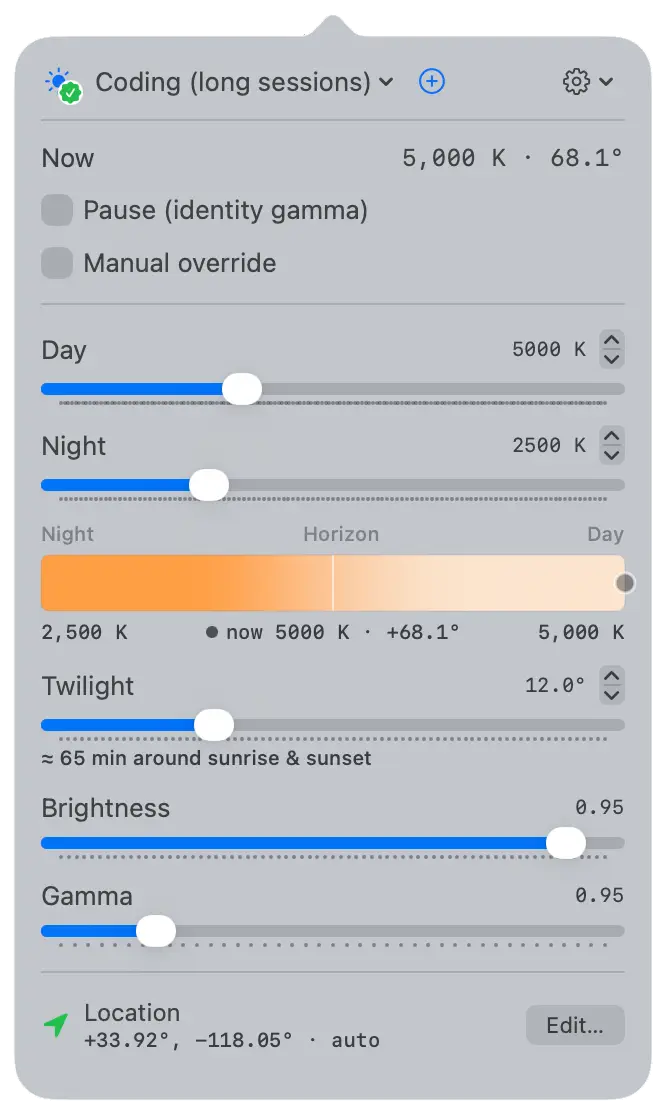
The goal here is a bare-metal feeling app that gives you precision control over brightness/temperature in a way that feels engineered, not whimsical. A clean power user interface, precise controls over temperature, transition, brightness, gamma, and configurable global hotkeys. I later added a feature to allow app-specific exemptions, turning off the dimming on a monitor only when that app (for example, photo editing) is in focus.
Smeagol Decides to Share
After many months of selfishly using this app on my Macbook, I realized I should share my precious with the world.
The first hurdle to distributing an app like this, is that the App Store doesn't allow apps that modify your display's gamma. This is why Screen Mercy, and any alternative, is distributed through direct download. Screen Mercy is Apple code-signed and notarized, so you can install it without any security warnings.
Since this was a personal side-side project (the idea occured while already coding a side project), it didn't even have a name. I eventually settled on Screen Mercy, thinking it would be clever to say "May God have mercy on your eyeballs". I found Mercy to be the right word, as Screen Mercy solves a painfully simple set of problems that have been imperfectly "solved" by other apps.
- Day and night targets. Your chosen temperature (in Kelvin) for each end of the day. Goes as low as 1000K.
- Gamma. Fine control over how midtones shift, so warm doesn't mean muddy.
- Transition smoothness (twilight). How long the fade takes around each solar event. Longer feels more gradual, shorter feels more decisive.
- Privacy-first design. Update checks are completely optional, and you can toggle auto-checking on or off. Your location is stored locally, and naturally, you can disable location and enter your coordinates manually. You can use Screen Mercy completely offline, or blocked by a firewall. There is no telemetry or data collection.
- Location-based timing. Automatically adjusts to your local sunrise and sunset times when enabled.
If you're a power user, the Pro Edition includes:
- App-specific exemptions. Turn off the dimming on a monitor only when that app is in use.
- Global hotkeys. Quick access to pause, manual override, and more settings.
- Unlimited Profiles Customize your experience with as many profiles as you need, each with their own settings.
Set these once and the rest happens on its own. When you do want control, pause and manual override are always one click away in the menu bar, or via hotkeys.
The free edition of Screen Mercy is fully functional. It's still privacy-focused, works offline, and has all the features you'd need for a typical use case. If you're a power user and want a little more control, I created the Pro Edition to help support continuing development. You keep the version you bought for life, and you get 5 years of free updates.
What I learned
I underestimated the effect of light on my sleep quality. Before diving into the research, blue light was a fad for gaming glasses. Now, I've got beeswax candles that burn when I'm working late, and Screen Mercy does the rest. This may be a stretch for some of you, but I leave my phone in a separate room when going to bed. Reducing blue light and phone usage prior to sleeping has made a noticeable improvement.
Sleep science has come a long way, and Screen Mercy is one piece of the puzzle towards improving your sleep. If you want to learn more about sleep, you may be interested in this YouTube interview with Dr. Matthew Walker & The Diary of a CEO: